Accounting software for small businesses, start-ups, cooperatives & limited liability companies: Which one really fits?
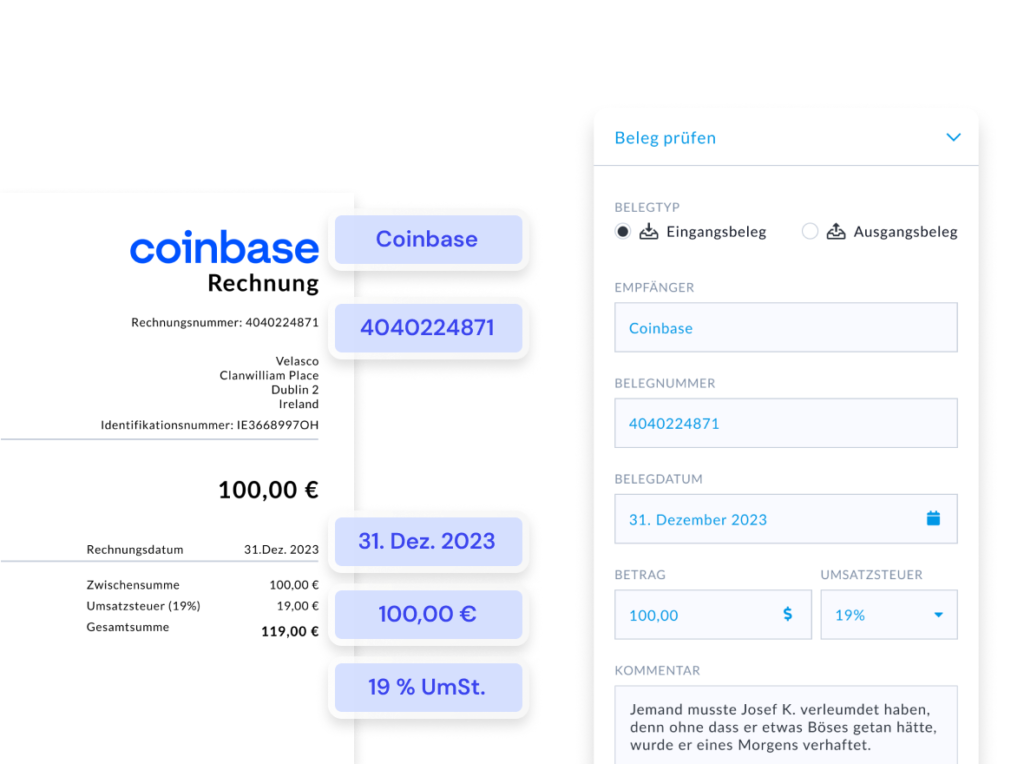
If you're looking for accounting software that noticeably reduces your workload as a small business owner, company founder or limited liability company, you should pay less attention to „nice invoice writing“ and more to automation: document recognition (OCR), bank reconciliation, booking suggestions, rules and a clean DATEV/tax consultant transfer. This is where „nice“ and „time-saving“ come together.
AccountingButler is particularly interesting if you save real time and at the same time Flexible (chart of accounts, roles, DATEV workflow). The provider states the following as a guideline Up to 12 hours of time saved per month and a average 76% faster accounting through automation.
Why this is relevant: For small companies, accounting is not complicated - it's repetitive. And it is precisely this „repetitive“ aspect that software can take over.
Affiliate links
What BuchhaltungsButler really brings to everyday life
1) Pure receipts → software understands them (instead of just „scanning“ them)
BuchhaltungsButler describes a modern OCR / document recognition, which recognizes amounts, tax rates, invoice issuers, etc. and derives posting proposals from them.
2) Bank reconciliation + automatic allocation
Account transactions are matched with receipts, receipts can be automatically assigned to payments - this is one of the biggest time levers, because you don't have to „click together“ every transaction.
3) Automation rules: „Set once, save permanently“
Typical examples:
- Recurring tools/subscriptions → always the same account + same tax key
- Same suppliers → Account assignment proposal sits
- Same payment methods → processed faster
The core: You build yourself a Autopilots for your standard cases.
4) Tax advisor is not replaced - but massively relieved
The DATEV marketplace describes precisely this use case: Clients make Preparatory accounting/selective preliminary account assignment, and the data (receipts + postings) go cleanly to DATEV for monthly/annual closing.
This often reduces queries, correction loops and thus law firm time (and indirectly costs).
Affiliate links
Why this „pops“ differently for small businesses, founders and limited liability companies“
Small business
Above all, you want: simple, fast, no errors. Automation is worth its weight in gold, especially for many small documents (tool subscriptions, travel expenses, cell phones, materials). And: The DATEV marketplace explicitly states that reverse charge issues should also be correctly supported in the context of the small business regulation.
Founder
Founders need two things:
- Speed (because nobody has time)
- Control (because liquidity/runway counts)
Regular evaluations and a clean process give you a „feel for the company“ instead of being surprised by the tax consultant once a quarter.
Ltd.
Clean processes are more important for GmbHs: more documents, more roles, more separate responsibilities. The DATEV marketplace mentions, among other things. User roles (admin, tax consultant, assistant, etc.) as a highlight.
This is practical if not „one person does everything“.
Why BuchhaltungsButler is particularly exciting for small cooperatives
If you have a small cooperative (eG) there is often a need for more structure: e.g. other charts of accounts (SKR42/SKR49), clear roles, audit-related processes. According to its own documentation, BuchhaltungsButler supports SKR42 and SKR49 and G/L account lengths from 4 to 8 digits.
In the DATEV marketplace, the Customizable chart of accounts structure (up to eight digits) and the seamless DATEV transfer are emphasized - which is often helpful for eG structures.
Flexibility: Why many „move on“ from lexoffice/sevDesk“
If you just want to write invoices, many tools are okay. If you want to „take accounting seriously“, account/evaluation flexibility is what counts:
- lexoffice says himself: It is not possible in any version, create individual posting accounts, change accounts, create sub-accounts or cost centers.
→ This can quickly become tight for growing companies, GmbHs or eG structures. - BuchhaltungsButler is available in the DATEV marketplace with, among other things Chart of accounts (incl. SKR42) and up to 8 digits and roles/automation are highlighted.
In short: If you really want to control evaluations, you need more than a „narrow chart of accounts“.
Checklist: How to find „the right one“ in 2 minutes
Pay attention to these 6 points - regardless of whether you are a small business owner, founder or limited company:
- Automation: OCR/document recognition + bank reconciliation + rules
- Tax consultant workflow: DATEV transfer for receipts + postings
- Chart of accounts flexibility: SKR03/04 (and SKR42/49 if applicable) + account length
- Roles & rights: if several people work together
- Evaluations: so that you really manage your company (not just “deliver”)
- Scalability: Will the tool still fit in 12 months?
Conclusion: Which software is right for you?
- You want maximum time savings + automation + flexibility: → AccountingButler (strong in OCR, bank reconciliation, rules, roles, DATEV)
- You want the maximum „law firm standard“ and are 100% at home in the DATEV ecosystem: → DATEV-related setups (depending on the law firm)
- You only want very simple standard cases and minimal book logic: → Beginner tools (with a view to limits, especially for accounts/cost centers)
FAQ (from our experience)
Is BuchhaltungsButler good for entrepreneurs without accounting knowledge?
Yes, because posting suggestions (pre-assignment), document recognition and automation rules take care of a lot of routine work. Nevertheless, it's worth setting up cleanly once.
How much time can you really save?
The provider states an average of approx. 76% faster and up to 12 hours per month. In practice, it depends very much on how recurring your cases are and whether you use rules.
What is the difference to lexoffice?
A key difference is the account flexibility: lexoffice allows, according to its own help No individual posting accounts. AccountingButler is much more flexible here (chart of accounts, length, customizability).
Can BuchhaltungsButler create invoices and e-invoices?
Yes - according to the knowledge base, you can create invoices, quotes and credit notes, including e-invoices and recurring invoices.
How does my tax advisor work with it?
Documents/postings can be transferred via DATEV interfaces (including the DATEV posting data service) - this is the „clean“ way for many law firms.
I am looking for accounting software for small cooperatives. What is the right one?
If you are responsible for a cooperative (eG), the „right“ accounting software is usually the one that is audit/law firm-capable - not the one that can only „write invoices“. Background: For cooperatives, the annual financial statements including bookkeeping are part of the mandatory cooperative audit. This is what BuchhaltungsButler offers. Why this is a good fit: Flexible chart of accounts (including SKR03, SKR04, SKR42, SKR49) and Account length 4-8 digits - important if you have to work properly according to the chart of accounts.
Which accounting software is good for small businesses and limited liability companies?
A good solution automates receipts (OCR), reconciles bank payments and transfers data cleanly to DATEV/tax consultants. BuchhaltungsButler advertises here, for example, with OCR, bank reconciliation, rules and DATEV integration.
How much time is saved with BuchhaltungsButler?
The provider states the following as a guideline up to 12 hours per month and Ø 76% faster through automation.
 English
  German